If your project “lives” in Slack, a spreadsheet, email, and a shared drive, it doesn’t live anywhere — it’s scattered across four half-updated versions of the truth.
For tool overload small teams often face a hidden productivity problem. Employees spend valuable time switching between apps, searching for information, checking updates, and trying to understand which version is correct.
The problem is not always the number of tools. It is the lack of a clear place where everyone can see what is happening.
What Is Tool Overload?
Tool overload is the accumulation of multiple, disconnected apps used to manage a single workflow where no single tool holds the complete, current picture.
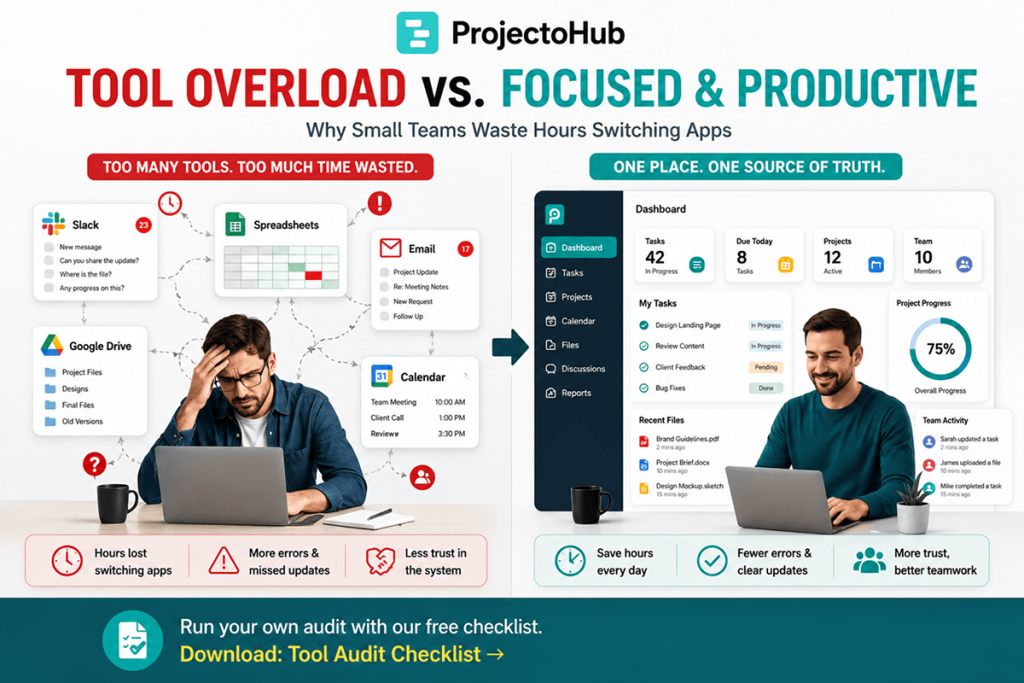
For tool overload small teams may use spreadsheets to track tasks, Slack for conversations, Google Drive for files, and personal calendars for deadlines.
It rarely looks dramatic from the inside.
It looks like:
- Tasks tracked in a spreadsheet
- Conversations happening in Slack
- Files sitting in Google Drive
- Deadlines living in someone’s personal calendar
No individual tool is necessarily the problem.
The real problem is the fragmentation between them.
How Tool Overload Builds Up Over Time
Nobody sets out to build a fragmented system.
It happens gradually.
A spreadsheet gets adopted because it is fast to set up. A chat app gets added for quick questions. A shared drive holds files because email attachments become difficult to manage.
Each addition solves an immediate problem.
None of them individually looks like the wrong decision.
The overload becomes visible when someone has to reconstruct:
“Where do things actually stand?”
They may need to check four or five different places before they can answer a simple question.
This is one of the biggest reasons tool overload small teams experience can quietly reduce productivity.
The Three Real Costs of Tool Overload
1. Time
Every context switch between apps costs time.
Employees need to remember what they were looking for, find the information, and mentally reconnect it to the task they were working on.
Switching between tools several times a day may seem insignificant.
But multiply those minutes across ten people and dozens of workdays, and the lost productivity can become substantial.
2. Errors
When the “source of truth” is actually four different sources, information can easily fall through the gaps.
For example:
A task may be marked as completed in Slack but still appear open in a spreadsheet.
A team member may work from an old file while another person has already updated it.
A deadline may be changed in one place but remain unchanged somewhere else.
These small inconsistencies can create unnecessary rework.
3. Trust
Trust may be the biggest cost.
Once employees experience outdated or contradictory information several times, they stop trusting the system.
Instead of relying on the information available, they start manually double-checking everything.
That creates even more work.
A system designed to save time can end up creating additional work when information is fragmented.
How to Identify Tool Overload in Small Teams
A simple audit can help you understand whether tool overload small teams experience is affecting your workflow.
Ask each team member:
“List every place you checked or updated something project-related yesterday.”
The list might include:
- Project management software
- Spreadsheet
- Slack
- Google Drive
- Calendar
- CRM
- Shared documents
If employees regularly need to check more than two or three separate places to understand the current status of a project, you may have a tool overload problem.
More importantly, this is usually a systems problem, not a discipline problem.
No amount of individual diligence can completely fix a fragmented system.
It simply makes people work harder to compensate for it.
Why Adding a New Tool Rarely Fixes Tool Overload
When a workflow feels messy, the natural reaction is often to search for another tool.
A team may think it needs:
- A better reporting platform
- A new task tracker
- Another communication app
- A dedicated dashboard
But adding another application can create another disconnected source of information.
Instead of four places to check, the team now has five.
The better solution is usually consolidation, not addition.
The goal should be to reduce the number of places where important project information lives.
How Small Teams Can Reduce Tool Overload
Start small.
You do not need to replace every application your team uses.
Instead, identify the information that causes the most confusion.
This is often:
- Task status
- Ownership
- Deadlines
- Project priorities
- Current files
Choose one central location for that information.
For example, your team might continue using chat for quick conversations and cloud storage for documents while keeping project status, ownership, and deadlines in one central system.
This approach can reduce the effects of tool overload small teams experience without forcing employees to abandon every specialized tool.
Key Takeaways
Tool overload small teams experience is usually caused by fragmentation rather than one “bad” application.
The biggest costs are:
- Lost time
- More errors
- Duplicate work
- Conflicting information
- Reduced trust in the system
The solution is usually consolidation, not addition.
Instead of giving employees another place to check, create a clear source of truth for important project information.
Frequently Asked Questions
How many tools is too many for a small team?
There is no universal number. However, if a project requires checking more than two or three separate places to understand its current status, it may be a sign of tool overload.
What causes tool overload in small teams?
Tool overload happens when teams use multiple disconnected applications to manage the same workflow, causing information to become scattered across different systems.
Is using different tools for different functions a bad idea?
Not necessarily. Specialized tools can work well when each has a clear purpose. The problem occurs when the same information, such as status, ownership, or deadlines, is tracked across multiple tools.
What is the first step to reducing tool overload?
Start with a simple tool audit. Identify every application employees use for project-related work, then determine which information creates the most confusion. Consolidate that information first.
Does consolidating tools mean eliminating every other application?
No. The goal is not to eliminate useful specialized tools. The goal is to establish one reliable source of truth for important project information.