Introduction: Why Teams Are Switching from Scrum to Kanban
In the fast-changing world of project management, flexibility often wins over rigidity. Many small and mid-sized teams that once relied on Scrum are now shifting toward Kanban for its simplicity and continuous flow. Scrum works well for structured sprint cycles, but Kanban provides real-time visibility and faster adaptability — something growing businesses truly value.
If you’ve been using Scrum and are considering a transition, don’t worry — migrating your workflow to Kanban is easier than you might think. Let’s break it down step-by-step so your team can experience a smooth transition without losing momentum.
Step 1: Understand the Difference Between Scrum and Kanban
Before migrating, it’s essential to understand what changes — and what remains the same.
-
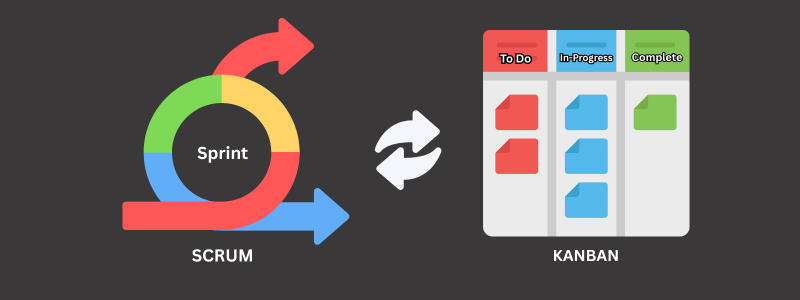
Scrum is built around fixed-length sprints, roles (Product Owner, Scrum Master), and ceremonies (standups, retrospectives).
-
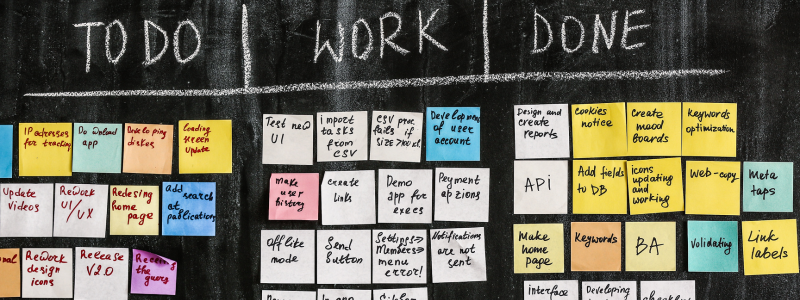
Kanban focuses on a continuous flow of tasks. There are no sprints; instead, work moves freely through stages like “To Do,” “In Progress,” and “Done.”
With tools like ProjectoHub, you can switch between both methodologies easily — visualize your board in Kanban view or adapt your Scrum backlog into a flow-based format without recreating everything.
Step 2: Audit Your Current Scrum Board
Look at your current backlog and sprint boards. Identify:
-
Which tasks are still in progress
-
What’s blocked or delayed
-
Which categories or labels do you frequently use
This helps you understand how to structure your new Kanban workflow. For example, “Backlog” in Scrum could become “Pending” or “Ideas” in Kanban.
If you’re using ProjectoHub, simply rename columns, drag and drop tasks, and retain all comments, attachments, and assignees.
Step 3: Redefine Your Workflow Stages
Kanban works best when your stages reflect real progress. Avoid having too many or too few columns — three to six stages is ideal.
Example:
-
To Do → In Progress → Review → Done
You can also add custom stages in ProjectoHub like Client Feedback or QA Testing, depending on your project type.
The goal is to visualize how work moves from idea to delivery, minimizing confusion.
Step 4: Set Work-in-Progress (WIP) Limits
Kanban is all about balance. WIP limits prevent team members from taking on too many tasks at once.
For example, if your “In Progress” column has a WIP limit of 4, no one should add a fifth task until one is completed.
ProjectoHub makes this simple with visual indicators that alert teams when WIP limits are exceeded. This encourages focus, quality, and accountability.
Step 5: Gradually Phase Out Scrum Ceremonies
Scrum has structured meetings — sprint planning, daily standups, and retrospectives. You don’t need to abandon these entirely, but you can simplify them.
Instead of sprint reviews, consider weekly check-ins using Kanban metrics like lead time and cycle time. ProjectoHub’s analytics dashboard helps track these automatically, giving you visibility without extra meetings.
Step 6: Educate and Align Your Team
Change management is key. Communicate why you’re moving from Scrum to Kanban and how it benefits the team — less time in meetings, more focus on flow, and quicker delivery.
Host a short session or share tutorial videos from your project management tool. ProjectoHub even offers free onboarding support for new teams making this exact transition.
Step 7: Track, Improve, and Iterate
After migration, observe how tasks move through the new system. Are bottlenecks forming? Are team members overloaded?
Kanban is about continuous improvement. Adjust WIP limits, rename columns, or automate status changes as needed. Tools like ProjectoHub make these tweaks effortless so you can keep optimizing without friction.
Why Kanban Migration Pays Off
Teams that move from Scrum to Kanban often report:
-
Fewer blockers because tasks flow continuously
-
Less burnout from rigid sprint pressure
-
Better visibility into progress and workload
-
Higher efficiency due to flexible prioritization
Kanban fits modern, fast-paced businesses that value agility over ceremony.
Final Thoughts
Migrating from Scrum to Kanban doesn’t mean starting from scratch. It’s about evolving how your team works — from sprint-driven planning to flow-based execution.
With an adaptive tool like ProjectoHub, you can switch methods, customize workflows, and maintain your team’s productivity while gaining the clarity that Kanban provides.
FAQs
1. Is Kanban better than Scrum for small teams?
For small teams that value flexibility, yes. Kanban reduces overhead and adapts quickly to change.
2. Can I use Kanban in ProjectoHub if I started with Scrum?
Absolutely. ProjectoHub lets you convert or customize your workflow anytime.
3. How long does migration take?
Usually, one to two days for small teams once workflows are mapped out.
4. What metrics should I track in Kanban?
Focus on lead time, cycle time, and throughput — all visible in ProjectoHub’s analytics view.