Why Privacy-Conscious Teams Prefer Self-Hosted Kanban Tools
In a world where almost every project management tool operates on the cloud, teams that value data privacy and full control are turning to self-hosted Kanban boards. These setups allow you to host your project data on your own servers, ensuring sensitive information never leaves your environment.
For teams handling confidential client projects, intellectual property, or regulated data, self-hosting offers transparency, security, and independence. While cloud-based systems are convenient, they often involve trade-offs with third-party access and data compliance — concerns that privacy-focused organizations can’t overlook.
What Makes a Good Self-Hosted Kanban Tool
Before we dive into examples, let’s break down what defines a strong self-hosted Kanban system:
-
Full Data Ownership – The platform should let you host everything — from task cards to user data — on your servers.
-
Easy Setup – Even though it’s self-hosted, it shouldn’t require a full DevOps team to install or maintain.
-
Customization Flexibility – The ability to tweak workflows, permissions, and automation rules.
-
Integration Options – It should work well with your existing tools like GitHub, Slack, or cloud drives.
-
Strong Security Features – Encryption, role-based access, and audit logs are a must.
A platform like ProjectoHub bridges this gap for small to medium teams. While it’s known for its intuitive Kanban interface and collaboration tools, it also supports private deployments for organizations that prefer self-managed environments.
Top Self-Hosted Kanban Options for Privacy-Conscious Teams
Here’s a look at some reliable options that balance privacy, usability, and performance.
1. ProjectoHub (Private Deployment)
For teams that want modern usability without losing control, ProjectoHub offers a hybrid deployment option. It’s designed to give teams full ownership of their data while retaining the simplicity of cloud-based project management.
With ProjectoHub, you can:
-
Host your instance on a secure private server or your preferred cloud infrastructure.
-
Use Kanban boards, task automation, file sharing, and chat — all under your domain.
-
Control data access at every level with advanced admin settings.
-
Enjoy an intuitive interface that keeps your team focused on progress, not complexity.
This makes it a smart pick for marketing agencies, software teams, and creative studios that handle sensitive data but still need an easy-to-use collaboration platform.
2. Taiga.io
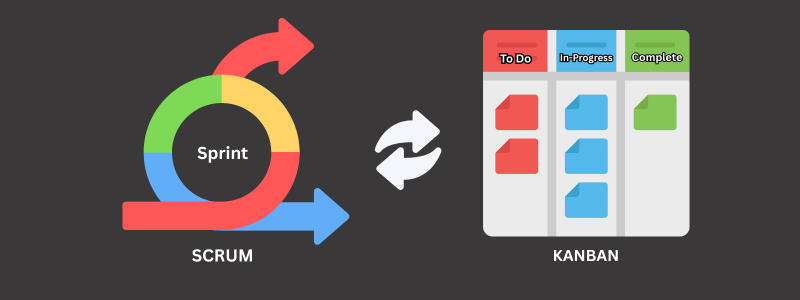
An open-source project management platform that offers both Scrum and Kanban boards. It’s ideal for agile teams who want flexibility with data control.
Taiga’s self-hosted version allows you to manage sprints, tasks, and documentation without relying on third-party servers. However, the initial setup might require some technical know-how.
3. Wekan
Wekan is one of the most popular open-source Kanban boards for privacy-first teams. Lightweight and customizable, it can run on your internal server with minimal effort.
It’s perfect for smaller teams who want a visual project tracker without enterprise complexity. However, it lacks some of the automation and reporting tools found in modern SaaS products like ProjectoHub.
4. Kanboard
Kanboard focuses on simplicity and self-hosted reliability. It’s an excellent choice for developers or teams who prefer functionality over fancy UI.
The platform supports automation, swimlanes, and plugin extensions — making it customizable but slightly technical to maintain.
Why Self-Hosting Isn’t Just About Privacy
While privacy is the headline benefit, self-hosting also means performance control, customization, and compliance.
For industries like healthcare, finance, and legal services, data sovereignty laws often require teams to store data within specific regions or infrastructure. Self-hosted Kanban boards solve that problem without sacrificing productivity.
ProjectoHub, for instance, helps such teams meet compliance requirements by allowing localized hosting and full encryption — ensuring your client data never leaves your jurisdiction.
Challenges of Self-Hosted Kanban (and How to Overcome Them)
Self-hosting isn’t without its hurdles. You’ll need to handle server maintenance, updates, and backups. However, many modern platforms like ProjectoHub simplify this with guided deployment and automated updates.
Other tips include:
-
Use managed hosting partners for stability.
-
Regularly back up your databases.
-
Keep software dependencies up to date.
-
Restrict admin-level access to trusted personnel only.
When done right, you get enterprise-level control without giving up ease of use.
The Future of Private Project Management
As data privacy regulations continue to evolve globally, more teams are rethinking how and where they store information. Self-hosted Kanban tools are becoming part of a larger privacy-first movement, helping companies strike a balance between security and efficiency.
Tools like ProjectoHub are leading the way with modular deployment models that combine the power of cloud features with the safety of local control. It’s the best of both worlds for teams who refuse to compromise.
Final Thoughts
Choosing a self-hosted Kanban platform is a strategic decision. If your team handles sensitive data or works in a regulated industry, it’s worth investing in a solution that offers both control and usability.
With options like ProjectoHub, Wekan, and Taiga, privacy-conscious teams can now enjoy the full benefits of visual project management — without exposing their data to unnecessary risks.
FAQs
1. Why should I choose a self-hosted Kanban board?
Because it gives you complete control over your data and helps meet privacy or compliance requirements.
2. Is self-hosting difficult to maintain?
Not necessarily. Platforms like ProjectoHub make it easy with guided setup and auto-updates.
3. Can I integrate third-party tools in self-hosted ProjectoHub?
Yes, ProjectoHub supports integrations with popular apps while keeping your data securely hosted.
4. Who benefits most from self-hosted Kanban tools?
Marketing agencies, software teams, healthcare firms, and privacy-driven organizations benefit most.
5. Does self-hosting affect performance?
No — with proper setup, you’ll often experience faster and more stable performance than cloud options.